How I Deploy Public and Private Apps on My Own Hardware With No Per-App Bill
One NixOS VM running k3s, two Traefik ingress classes, a Cloudflare Tunnel for public apps and NetBird for private ones. Adding an app is a ClusterIP Service plus an Ingress, and DNS and TLS happen on their own.
I run a handful of side projects and internal tools. Some need to be on the internet. Most should only be reachable by me. I wanted one way to deploy both, without paying a platform for every new thing I spin up.
Between model subscriptions and token bills, #aiisalreadyexpensive. I’m not adding a hosting line item per side project on top of it.
The setup
One NixOS VM runs a single-node k3s cluster inside Incus, on hardware I already own. NixOS manages the machine, k3s and the NetBird client. Argo CD deploys the apps from a private GitOps repo.
I disable k3s’s bundled Traefik and ServiceLB and run two Traefik instances. Each watches its own ingress class:
publicreceives traffic through a Cloudflare Tunnel.cloudflaredconnects outbound, so I don’t open inbound ports at home.privatereceives traffic over NetBird, a WireGuard-based mesh VPN. You need to be on the mesh, with an access policy that lets you through.
Both Traefik Services are ClusterIP. Neither exposes a NodePort or LoadBalancer on the LAN.
external-dns creates DNS records, and cert-manager gets certificates for private apps. Cloudflare handles public TLS. It can see the plaintext, which I’m fine with for my public side projects. Anything I’m less comfortable with stays private.
How traffic reaches the apps
The public tunnel has one catch-all rule pointing at public Traefik. Traefik routes by hostname, so adding an app never means editing the tunnel config.
Private traffic needed more work. A systemd socket proxy listens on the VM’s NetBird address at port 443 and forwards to private Traefik’s fixed ClusterIP.
In my debugging, DNAT and an externalIP Service failed because kube-router’s NetworkPolicy appeared to rewrite a packet mark NetBird’s forward filter expected. Terminating the connection locally and opening a fresh one worked. That’s my explanation from testing on this setup, rather than something from NetBird’s docs. The tradeoff is that Traefik sees the node’s address as the client. NetBird’s policy has already decided who can reach the port.
Each ingress class has its own external-dns instance:
- Private records are DNS-only and point at the VM’s NetBird address. These are public DNS records, so the hostnames are discoverable. Connecting still requires mesh access. I accepted that instead of running split-horizon DNS.
- Public records are proxied CNAMEs pointing at
<TUNNEL_ID>.cfargotunnel.com.
The instances use separate txtOwnerId values so they don’t fight over records. Both use upsert-only, which prevents external-dns from deleting records. I clean up retired ones by hand.
For private certificates, cert-manager uses DNS-01 against Cloudflare. Let’s Encrypt never needs to connect to the private app.
Adding an app
Once the workload and its Argo Application exist, exposing it takes a Service and an Ingress. Here’s a private app, with placeholder addresses and domains:
apiVersion: v1
kind: Service
metadata:
  name: myapp
spec:
  type: ClusterIP
  selector: { app: myapp }
  ports:
    - port: 80
      targetPort: 8080
---
apiVersion: networking.k8s.io/v1
kind: Ingress
metadata:
  name: myapp
  annotations:
    cert-manager.io/cluster-issuer: letsencrypt
    external-dns.alpha.kubernetes.io/target: "100.64.0.10"
spec:
  ingressClassName: private
  tls:
    - hosts: [myapp.example.com]
      secretName: myapp-tls
  rules:
    - host: myapp.example.com
      http:
        paths:
          - path: /
            pathType: Prefix
            backend:
              service: { name: myapp, port: { number: 80 } }
For a public app, I use the same Service, set ingressClassName: public, remove the tls block and cert-manager annotation, and change the DNS target to <TUNNEL_ID>.cfargotunnel.com. The explicit target tells external-dns where to point the record despite the ClusterIP Service.
After a push, Argo syncs the manifests, external-dns writes the record, and cert-manager issues the private certificate. No NixOS rebuild, reverse-proxy vhost, firewall rule or manual DNS entry.
A new domain still needs a one-time zone and token setup. And if the app has a restrictive NetworkPolicy, it must allow traffic from the ingress namespace, or you’ll get a gateway error with a healthy pod behind it.
Keeping deploys contained
Each app gets an Argo AppProject scoped to its namespace and allowed resource kinds. Namespaces use the restricted Pod Security level. Automatic prune is off, and Namespaces and PVCs have deletion protection. Removing a file from Git won’t delete the data.
Argo’s repo key is read-only. App CI builds images but can’t write to the GitOps repo. Before I push, a check script rejects NodePorts, LoadBalancers, externalIPs, and Ingresses outside the two allowed classes.
Bootstrap secrets live encrypted in SOPS, with sops-nix supplying them at boot. App secrets come from a separately self-hosted Infisical instance through its Kubernetes operator. The Postgres operator generates database credentials. None of those credentials go into Git as plaintext.
The Cloudflare DNS token and tunnel credentials are an exception to my usual rule against infrastructure tokens on app nodes. The cluster needs them. I scope the DNS token to my app zones, but a compromised node could still change those DNS records.
What it costs
Adding another app carries no per-app hosting bill. Running the setup still costs me:
- Hardware, electricity and domains. The machine was already on, but extra power isn’t free.
- A small rented VPS for NetBird’s control plane.
- Time. The first setup took a lot of it.
To be fair, “the machine was already on” is doing some work here. My server’s power graph sits around 200 W most of the week, with spikes above 400 W. A constant 200 W works out to about 144 kWh over 30 days, before the rest of the home uses anything.
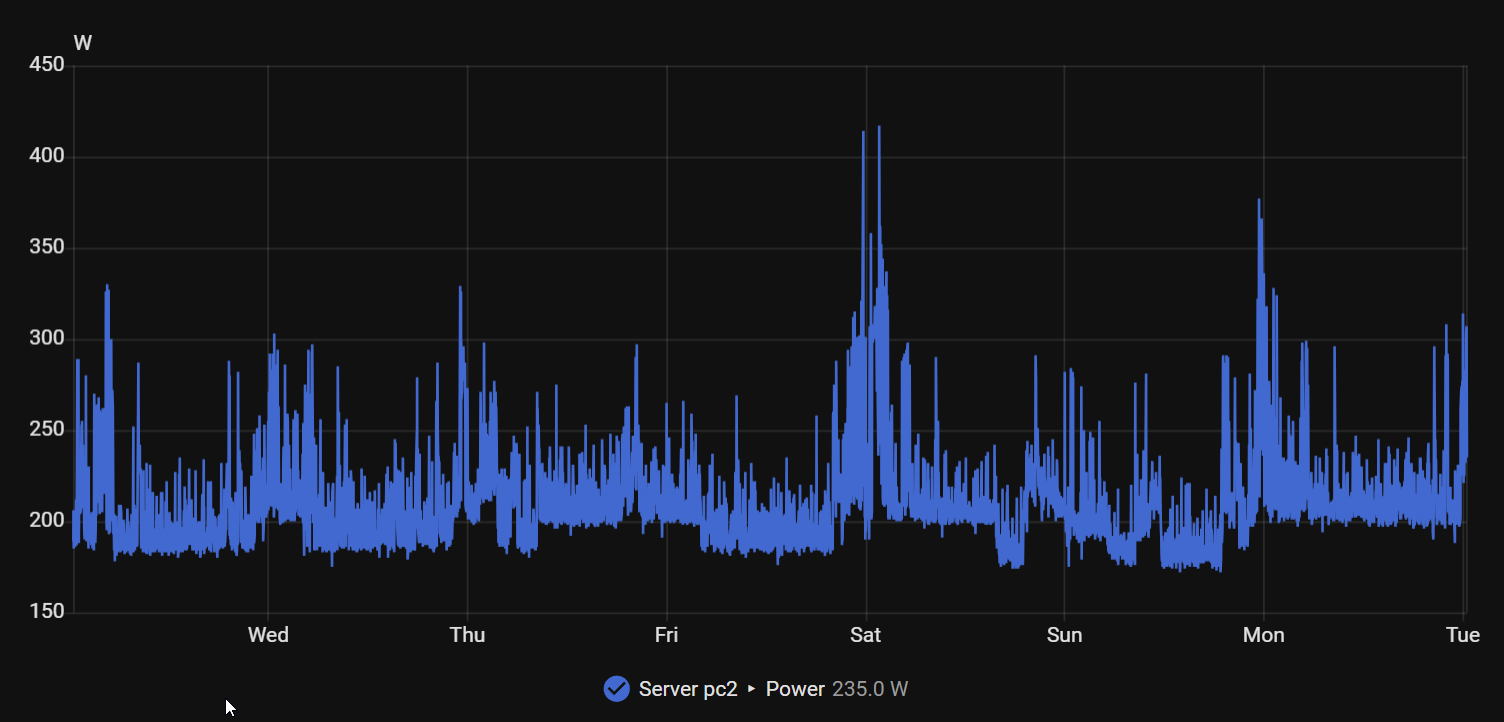
My September electricity bill was 473 kWh for the whole home. I don’t own a car, but judging by my electricity use, you’d think I had a family EV charging outside. I have a homelab instead.
Cloudflare costs me nothing on my current account. Check its current plans and limits before relying on the same arrangement.
I also own the outages. One node means no high availability. A power cut or a bad Nix rebuild takes everything down. Argo can recover the declared configuration from Git, but I wouldn’t run anything that pays my rent on this.